916.373.0126

CapitolTrack

CapitolTrack is your daily dashboard for tracking and reporting on California bills from idea to law.

Link

BudgetTrack

BudgetTrack keeps you informed about changes that could impact your interests in California’s state budget.

Link

ContributionTrack

ContributionTrack simplifies your California giving strategy with a fundraiser event calendar and reporting tools.

Link

https://campaign-image.com/zohocampaigns/657439000000284404_analysis_and_tips_logo.png

Vote Scorecards

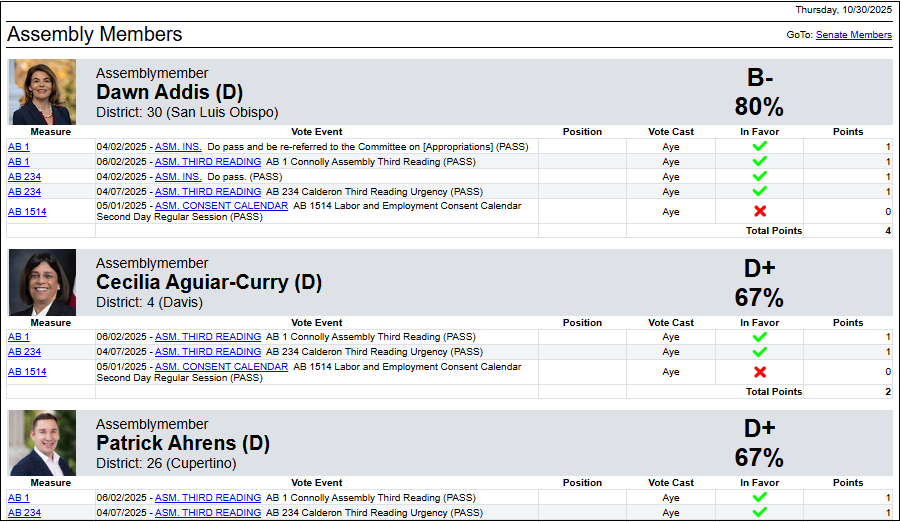
     With the Legislature on break and the Governor’s desk clear of bills, now’s the best time for an analysis of the 2025 session. Try the Vote Scorecards format in CapitolTrack Version 3.5.  Easily find the Members who voted with your interests and those who did not.

https://campaign-image.com/zohocampaigns/657439000000284404_2_zc-noimage.png

Run a Vote Scorecard by following these steps: (or watch the video!)

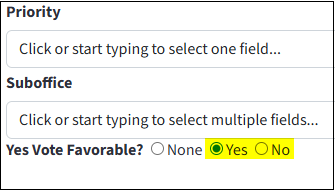
  • Mark each measure by which you’d like Members scored on the Tracking Form. Use the Preferred Vote field where ‘Yes’ is a supported bill and ‘No’ is an opposed bill.
https://stratus.campaign-image.com/images/657439000016889058_zc_v1_1761837276905_preferred_vote.png
  • Once you’ve marked all the measures you’d like members scored by, click on New Report on the Workspace.
  • Find the Vote Scorecard format on the Format dropdown menu and select it.
  • Click Run at the bottom of the Report Filters screen.
  • Finally, click the Preview tab above the report and we’ll apply the Vote Scorecard format so you can review all Members’ votes across all your scored bills.
If you would like any help with your Vote Scorecard or have any questions, please contact us!